
Salesforce Ben's AppAssessor review of Distribution Engine - check it out now!
Test it for free for 30 days or get in touch if you’d prefer to chat.
Fancy giving Distribution Engine a try?
Have a play around for free, or get in touch if you’d prefer to chat.
What is Lead-to-Account Matching and Routing? How to Build an ABM-Ready Salesforce Instance
Key takeaways:
ABM Starts With Matching, Not Marketing: Account-based marketing in Salesforce only works if incoming leads are instantly matched to the right account. Without lead-to-account matching, ABM is just a strategy deck.
Matching Accuracy Defines Routing Quality: Fuzzy matching, domain matching, and deduplication determine whether your routing engine sends leads to the right rep or the wrong queue. Precision here compounds across your entire funnel.
Matching Without Routing Is Incomplete: Identifying that a lead belongs to an existing account is only half the problem. The lead still needs to reach the account owner - automatically, in real time, without manual handoffs.
Messy Data Is the Default: Duplicate leads, inconsistent company names, and personal email domains make native Salesforce matching unreliable at scale. Intelligent enrichment and normalisation are prerequisites, not nice-to-haves.
Auto-Conversion Eliminates Friction: For teams running account-based motions, automatically converting matched leads into contacts under existing accounts removes the manual conversion step that kills speed-to-lead.
Distribution Engine Closes the Loop: NC Squared's Distribution Engine handles the full workflow natively in Salesforce - matching leads to accounts, deduplicating records, auto-converting when appropriate, and routing to the right owner based on account context, availability, and workload.
Your marketing team runs a targeted ABM campaign against your top 200 accounts. The campaign works - three qualified leads come in from Acme Corp on Tuesday morning. But here's what happens next:
Lead one hits Salesforce and gets round-robined to a rep who has never spoken to Acme. Lead two creates a duplicate contact because the company name field says "ACME Corporation" instead of "Acme Corp." Lead three sits in the default queue because nobody's assignment rule caught it.
Meanwhile, Sarah - the AE who's been nurturing the Acme relationship for six months - has no idea any of this happened. By Wednesday, two of those leads have gone cold and the third is confused about why someone different from their usual contact is reaching out.
This is what happens when you invest in account-based marketing without building the infrastructure to support it. The strategy is sound. The execution layer is broken.
Lead-to-account matching and routing is how you fix it.
What Is Lead-to-Account Matching?
Lead-to-account matching is the process of identifying whether an incoming lead in Salesforce relates to an existing account, contact, or lead record in your CRM. When a new lead enters the system, the matching engine evaluates it against your existing data to determine:
Does this person belong to a company we already know? If so, the lead should be linked to that account rather than treated as a net-new prospect.
Is this person already in our system? If a matching contact or lead already exists, the new record may be a duplicate that needs to be merged rather than routed separately.
Who currently owns that account relationship? If the lead matches an existing account, the logical owner is the rep already managing that relationship - not whoever happens to be next in the round-robin queue.
This sounds straightforward in principle. In practice, it's one of the hardest problems in Salesforce operations - because the data is never as clean as you need it to be.
Why Lead-to-Account Matching Matters for ABM.
Account-based marketing in Salesforce depends on a simple premise: treat target accounts as unified entities, not collections of disconnected leads. Every interaction with someone from a target account should strengthen the existing relationship, not fragment it.
Without lead-to-account matching, ABM breaks down at the operational level:
Leads from target accounts get routed to the wrong reps. If your routing engine doesn't know that a new lead belongs to an existing account, it treats that lead like any other inbound - assigning it through standard rules that ignore the account context entirely.
Duplicate records pollute your CRM data. The same person submits a form twice, or two people from the same company come in through different campaigns. Without matching and deduplication, you end up with fragmented records that make it impossible to see the full account picture.
Account owners lose visibility into their pipeline. When leads from their accounts bypass them, AEs can't manage relationships holistically. They find out about inbound interest days later - if at all.
Forecasting becomes unreliable. If leads aren't properly linked to accounts, pipeline reporting at the account level is incomplete. Your ABM dashboard says one thing; reality says another.
The operational reality is clear: you can't run an account-based motion on a lead-based infrastructure. Lead-to-account matching is the bridge.
How Lead-to-Account Matching Works in Salesforce.
Salesforce provides native building blocks for lead-to-account matching through its Duplicate Management framework - specifically, Matching Rules and Duplicate Rules. Understanding how these work is essential before layering on automation.
Matching Rules.
Matching rules define the criteria Salesforce uses to identify potential duplicates or matches. The platform provides standard matching rules for Leads, Contacts, and Accounts that evaluate fields like:
- First Name and Last Name
- Email Address
- Company Name
- Phone Number
- Mailing Address
These standard rules use fuzzy matching algorithms - meaning they can identify matches even when the data isn't identical. "Jon Smith" and "Jonathan Smith" can match. "Acme Corp" and "Acme Corporation" can match. The matching logic accounts for common variations, abbreviations, and data entry inconsistencies.
You can also create custom matching rules that evaluate fields specific to your business - industry, website domain, or custom identifiers.
Duplicate Rules.
Duplicate rules determine what happens when a matching rule finds a potential match. They can:
- Alert the user that a potential duplicate exists
- Block the creation of a duplicate record
- Report the match for later review
For lead-to-account matching specifically, the duplicate rule connects a Lead matching rule to Account (or Contact) matching rules, enabling Salesforce to check incoming leads against your existing account and contact database.
The Native Limitation.
Here's the problem: Salesforce's native matching infrastructure identifies matches. It doesn't act on them automatically in the context of lead routing.
When a new lead matches an existing account, native Salesforce can flag the match or block the duplicate. What it can't do - without custom development - is:
- Automatically route the lead to the account owner
- Convert the lead into a contact under the matched account
- Merge duplicate leads and consolidate the data
- Apply different routing logic for matched vs. unmatched leads
This is the gap between "knowing" a match exists and "doing something about it" - and it's exactly where automation tools become essential.
Building the Matching Logic: Exact, Fuzzy, and Domain Matching.
Effective lead-to-account matching requires multiple matching strategies working together. No single approach handles every scenario.
Exact Matching.
The simplest form: field values match precisely. Email address is the most reliable exact match field - if the incoming lead's email matches a contact's email on an existing account, you have a high-confidence match.
Exact matching works well for email and unique identifiers. It falls apart for company names, addresses, and phone numbers, where formatting variations are the norm.
Fuzzy Matching.
Fuzzy matching algorithms evaluate similarity rather than requiring identical values. Salesforce's native fuzzy matching handles common scenarios:
- Name variations: "Bob" matches "Robert," "Jr." matches "Junior"
- Company abbreviations: "Inc." matches "Incorporated," "Ltd" matches "Limited"
- Typos and transpositions: "Gogle" matches "Google"
The accuracy of fuzzy matching depends on the quality of the algorithm and the thresholds you configure. Too strict, and you miss legitimate matches. Too loose, and you create false positives that send leads to the wrong accounts.
A common question teams ask: "How does Salesforce's native lead-to-account matching compare to third-party tools?" The honest answer is that native matching handles standard scenarios well but struggles with complex data - subsidiaries with different names, companies that have rebranded, or leads using personal email addresses from company domains.
Domain Matching.
Domain matching is particularly powerful for B2B lead-to-account matching. The logic: extract the email domain from the incoming lead (e.g., "acme.com" from "sarah@acme.com"), then check whether any existing accounts have contacts with matching email domains.
This catches leads that fuzzy matching might miss - a new contact from a known company, even if their name and phone number are entirely different from anyone in your system.
The critical nuance: domain matching needs intelligence to differentiate between corporate email domains and personal ones. Matching against "gmail.com" or "yahoo.co.uk" would link every lead using a personal email to the same account. Smart matching engines filter these out automatically.
Distribution Engine's Lead Matching module handles all three strategies - exact, fuzzy, and domain matching - using Salesforce's native duplicate matching logic while adding domain intelligence that differentiates between company and personal email domains. It extracts domains from all existing contacts, maps them to accounts, and uses this index to match incoming leads automatically.
Deduplication: The Prerequisite Your CRM Probably Needs.
Before lead-to-account matching can work reliably, you need to address the duplicate problem. Most Salesforce orgs have a duplication rate between 10% and 30% - meaning a significant portion of your lead database contains redundant records that will contaminate matching results.
Why Duplicates Kill Matching Accuracy.
If your database contains three records for the same person at the same company, your matching engine might:
- Match the new lead to the wrong existing record (the one with incomplete data)
- Create a fourth duplicate because none of the existing records meet the matching threshold
- Route the lead to a rep who "owns" one of the duplicate records but not the actual account
Salesforce duplicate management provides the framework for identifying duplicates. But systematic deduplication - merging records, consolidating data, and preventing new duplicates from being created - requires operational discipline and tooling.
Deduplication as Part of the Matching Workflow.
The most effective approach integrates deduplication directly into the matching and routing workflow. When a new lead enters Salesforce:
- Match against existing leads - Is this person already in the system as a lead? If yes, merge or flag.
- Match against existing contacts - Is this person already a contact on an account? If yes, link and route to the account owner.
- Match against existing accounts - Does this person's company match an existing account? If yes, route to the account owner.
- If no match - Route through standard distribution logic (round-robin, territory, weighted, etc.)
This cascading approach ensures every incoming lead is evaluated against the full context of your CRM before any routing decision is made.
Distribution Engine's Classifier module automates this exact workflow - performing Lead-to-Lead, Lead-to-Contact, and Lead-to-Account matching in sequence, deduplicating where matches are found, and routing based on the result. Where leads match to other leads, the Classifier can merge duplicates automatically. Where leads match to accounts, the routing logic sends them to the account owner.

Lead Auto-Conversion: Removing the Manual Step.
For teams running account-based motions, there's a further question: once a lead matches an existing account, should it remain a lead, or should it be automatically converted into a contact under that account?
The Case for Auto-Conversion.
In an ABM model, the Lead object is often a temporary holding area. The goal is to get every relevant person attached to the right Account as quickly as possible. Manual lead conversion introduces delay and inconsistency:
- Reps forget to convert leads after first contact
- Conversion mapping errors cause data loss (custom fields don't carry over)
- Leads sit unconverted for days, creating phantom pipeline that skews reporting
Auto-conversion eliminates this friction. When a lead matches an existing account, the system automatically converts it into a Contact under that Account - preserving all field mappings, triggering the native Salesforce conversion process, and optionally creating an Opportunity.
When Not to Auto-Convert.
Auto-conversion isn't always appropriate. If a lead matches an account but the match confidence is low (a fuzzy company name match with no email domain confirmation), automatic conversion could link the wrong records. Build confidence thresholds into your conversion logic.
Similarly, some teams prefer to keep certain leads as leads until they reach a scoring threshold - only converting once the lead has been qualified. This hybrid approach uses matching for routing (sending the lead to the account owner) while preserving the Lead object for qualification workflows.
Distribution Engine supports both approaches - auto-converting leads based on match results with configurable rules, or routing matched leads to account owners without converting, depending on your process.
Account-Based Routing: The Complete Workflow.
With matching, deduplication, and (optional) auto-conversion in place, the routing workflow for an ABM-ready Salesforce instance looks like this:
New lead enters Salesforce → Classifier evaluates the lead → Matching engine runs → Routing decision is made.
The routing decision depends on the match result:
Matched to an existing account: Route to the account owner. The rep who owns the relationship should work every lead from that account, regardless of where the lead came from or how it scored.
Matched to an existing lead or contact: Flag or merge the duplicate. If the existing record has an owner, route to them. If not, apply standard routing logic.
No match found: This is a net-new lead. Route through your standard distribution logic - round-robin, territory-based, weighted, or capacity-based assignment.
This is what makes lead-to-account matching and routing a complete system rather than just a feature. Matching tells you where the lead belongs. Routing gets it there. And the entire workflow needs to happen in real time - before the lead goes cold.
The Speed Factor.
Account-based routing without speed is just well-organised latency. The matching and routing decision needs to happen in seconds, not minutes. If the lead sits in a queue while someone manually checks whether it belongs to an existing account, you've lost the speed-to-lead advantage.
Teams like Tebra reduced lead response time by 40% and increased conversions by 30% by consolidating their routing - including lead-to-account matching - into a single automated workflow with Distribution Engine.
That's the compounding effect: faster matching → faster routing → faster first touch → higher conversion.
Handling Messy Data: The Real-World Challenge.
Every guide on lead-to-account matching assumes your data is clean. Your data isn't clean. Nobody's data is clean.
Here's what the real world looks like:
Company name variations. "International Business Machines," "IBM," "I.B.M.," and "ibm corp" are all the same company. Your matching engine needs to handle this. Salesforce's native fuzzy matching covers some scenarios, but subsidiaries, acquisitions, and trade names create edge cases that require additional logic.
Personal email addresses. A VP of Sales at your target account submits a form using their personal Gmail address. Native matching won't connect them to the account because there's no domain match. You need supplementary matching - last name + company name, or phone number, or LinkedIn URL - to catch these.
Incomplete records. Leads come in from webinar registrations with just a name and email. No company, no phone, no address. Your matching engine has minimal data to work with. Enrichment - either through third-party data providers or through progressive profiling - is necessary to give matching logic enough signal.
Multi-entity accounts. A lead from "Acme UK" should match to your "Acme Global" account. But does your matching logic understand parent-subsidiary relationships? Most native configurations don't handle this without custom field mapping.
These data challenges are precisely why matching accuracy is such a frequently benchmarked metric among RevOps teams. The difference between 80% matching accuracy and 95% matching accuracy translates directly into leads routed correctly vs. leads misrouted or lost.
Distribution Engine's approach addresses messy data at multiple points: fuzzy matching handles company name variations, domain matching catches email-based connections, and the Territory Classifier normalises geographic data. For teams that need further enrichment, the matching output integrates with third-party enrichment tools before the routing decision is made.
Lead-to-Account Matching Tools: What to Look For.
When evaluating lead-to-account matching tools for Salesforce, focus on these capabilities:
Native Salesforce integration. Tools that operate inside Salesforce - using Salesforce's own matching infrastructure and data model - avoid the sync issues, latency, and security concerns that come with external platforms. Look for solutions that run natively rather than through API integrations.
Configurable matching logic. Your matching requirements will evolve. The tool should support exact matching, fuzzy matching, domain matching, and custom field matching without requiring development resources to configure.
Real-time processing. Matching needs to happen the moment a lead enters Salesforce - not in batch jobs that run overnight. Real-time matching is the foundation of real-time routing.
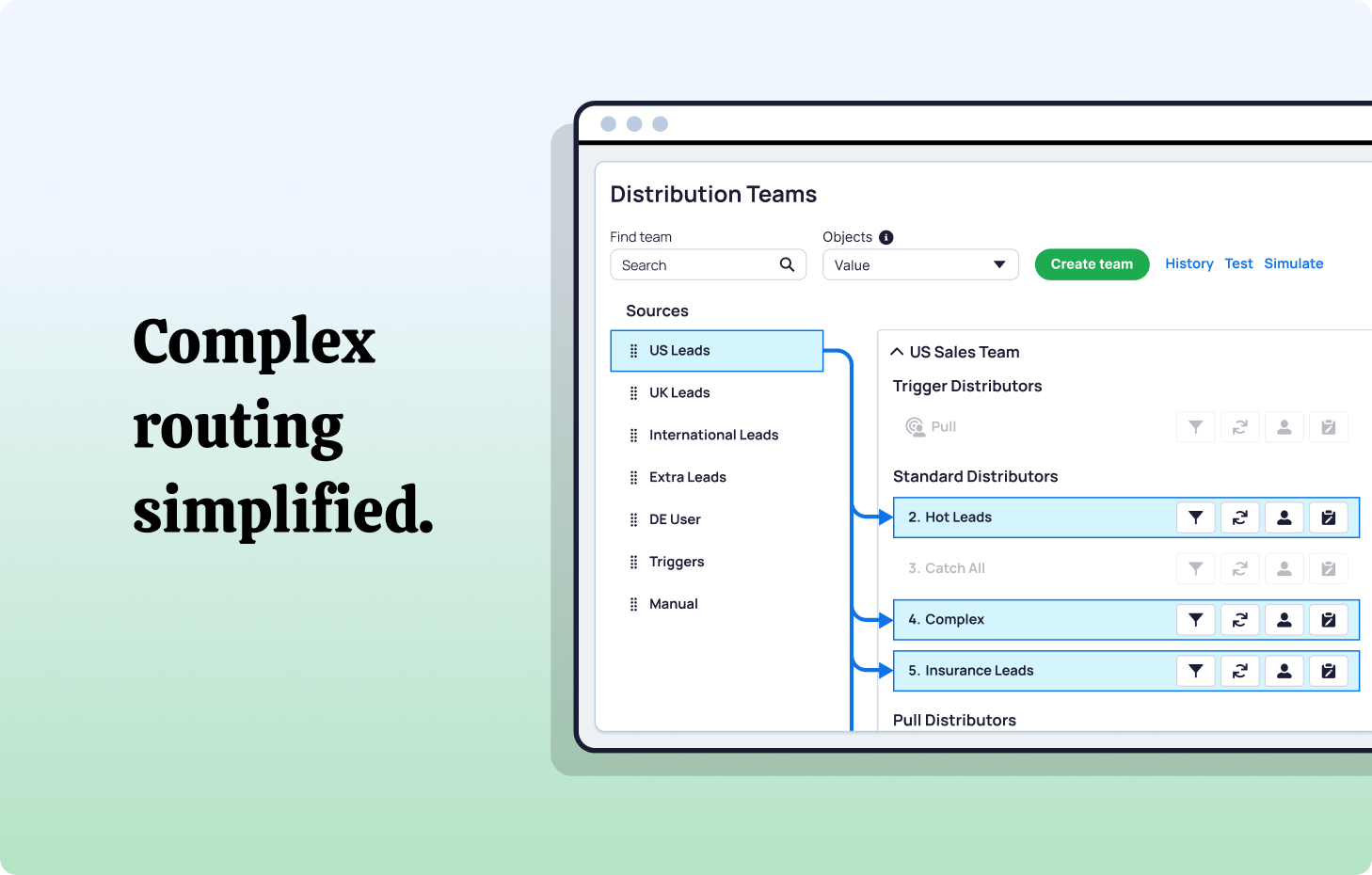
Integrated routing. Matching without routing is an incomplete solution. The tool should handle the full workflow: match the lead, determine the routing destination, and assign the lead - all in one step.
Deduplication and auto-conversion. For ABM-ready instances, the tool should support automatic deduplication of matched leads and optional auto-conversion into contacts under matched accounts.
Scalability. Your matching engine needs to perform against your full database - potentially millions of accounts and contacts - without degrading response time.
Distribution Engine meets all of these criteria as a 100% Salesforce-native solution. Its Classifier module handles matching, deduplication, and auto-conversion, while the routing engine handles assignment based on account ownership, territory, availability, and workload - all within a single workflow that runs in real time inside Salesforce.
Best Practices for Lead-to-Account Matching and Routing.
Start with data hygiene.
Matching accuracy is a function of data quality. Before implementing or optimising matching logic, audit your account and contact data for:
- Inconsistent company naming conventions
- Duplicate account records
- Missing email domains on contacts
- Outdated or orphaned records
Clean data makes matching easier. Dirty data makes even the best matching logic unreliable.
Layer matching strategies.
Don't rely on a single matching approach. Use domain matching as your primary high-confidence signal, fuzzy name matching as a secondary layer, and exact field matching for unique identifiers. Each layer catches matches the others miss.
Define what happens after a match.
Matching is the diagnosis. Routing is the treatment. For every match scenario, define the action:
- Matched to account with active owner → Route to account owner
- Matched to account without active owner → Route through territory or round-robin
- Matched to existing lead → Merge and route to lead owner (or reassess)
- Matched to existing contact → Link to account, route to account owner
- No match → Route through standard distribution
Set confidence thresholds.
Not every match is equal. A domain match with company name confirmation is high confidence. A fuzzy name match with no email signal is lower confidence. Build thresholds into your workflow so that high-confidence matches trigger automatic routing, while lower-confidence matches are flagged for review.
Monitor matching performance.
Track your matching rate (what percentage of incoming leads match to existing accounts), false positive rate (matches that were incorrect), and coverage gap (leads that should have matched but didn't). These metrics tell you whether your matching logic needs tuning.
Integrate matching with SLA enforcement.
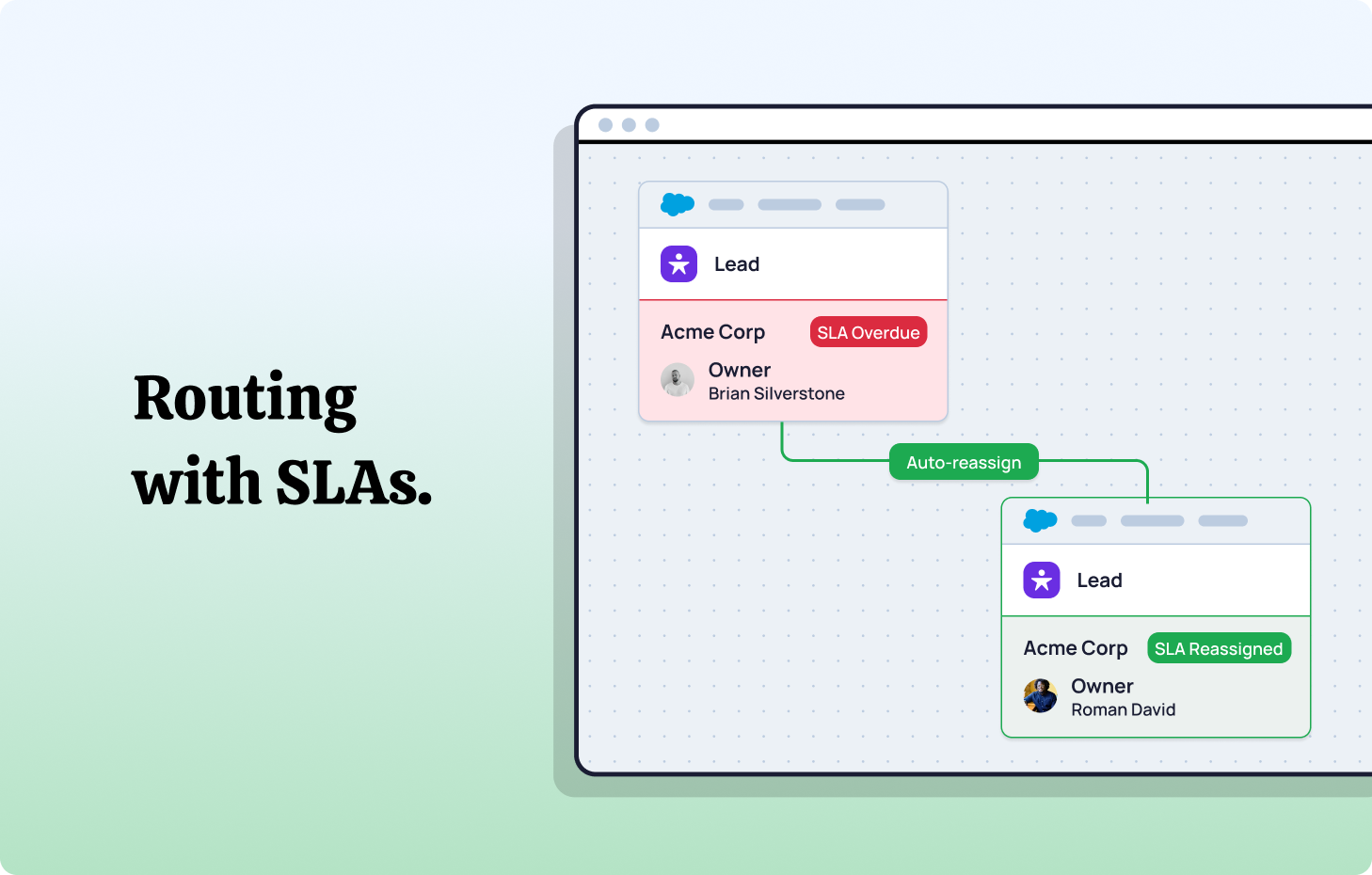
Matched leads should still be subject to speed-to-lead SLAs. If an account owner doesn't act on a matched lead within the defined timeframe, automated reassignment should kick in - routing the lead to the next best option within that account's territory or team.
Learn more about SLA-based lead routing
Salesforce ABM Architecture: Putting It All Together.
An ABM-ready Salesforce instance isn't built in a single sprint. It's an architecture that combines structural elements (account hierarchies, territory models) with operational elements (matching, routing, SLAs) into a unified system.
Here's how the layers connect:
Foundation: Clean CRM data. Standardised company names, populated email domains, deduplicated records. This is the base everything else depends on.
Structure: Account segmentation and territory management. Define your target accounts, organise them into territories, and assign ownership.
Intelligence: Lead-to-account matching. Incoming leads are automatically evaluated against your account database using domain, fuzzy, and exact matching logic.
Action: Automated routing. Matched leads go to account owners. Unmatched leads go through standard distribution. Everything happens in real time with availability and capacity awareness.
Accountability: SLA tracking and reassignment. Automated timers, alerts, and reassignment logic ensure every lead is worked on time - regardless of whether it was matched or net-new.
Visibility: Reporting and dashboards. Territory-level, account-level, and rep-level performance data built on clean, properly matched CRM records.
Each layer reinforces the others. Matching accuracy improves routing precision. Routing precision improves speed-to-lead. Speed-to-lead improves conversion. And clean data makes all of it possible.
From Lead Chaos to Account Intelligence with NC Squared.
Most Salesforce instances treat every inbound lead like a stranger. Even when that lead works at your biggest customer. Even when their colleague submitted the same form last week. Even when the account owner has been nurturing that relationship for months.
Distribution Engine changes this.
Its Classifier module handles the full matching and routing workflow - natively inside Salesforce:
- Lead-to-Account matching using domain, fuzzy, and exact logic with intelligent filtering of personal email domains
- Lead-to-Contact matching to identify and merge duplicates before they pollute your data
- Lead-to-Lead matching to catch and consolidate repeat submissions
- Auto-conversion that transforms matched leads into contacts under existing accounts - triggering native Salesforce conversion with full field mapping integrity
- Account-based routing that sends matched leads to the account owner automatically
- Standard distribution for unmatched leads using round-robin, territory, weighted, or capacity-based algorithms
Because it's 100% Salesforce-native, there are no external systems, no data sync delays, and no security risks. Your matching and routing logic runs inside your CRM - where the data lives and where your team works.
Across 20,000+ users, teams running Distribution Engine achieve routing accuracy above 95% and lead response times under 10 minutes. That's the operational foundation an ABM strategy actually requires.
If your leads from target accounts are still being round-robined to random reps, it's time to close the matching gap.
See how Distribution Engine automates lead-to-account matching and routing - directly inside Salesforce.
Fancy giving Distribution Engine a try?
Have a play around for free, or get in touch if you’d prefer to chat.


Take us for a spin with a 30 day Free Trial
Have a play around for free, or get in touch if you’d prefer to chat.
%20dark.avif)